Home · Products · AP Invoices
Accounts Payable

Every supplier invoice, checked before you pay

TechFinLens reads each payable with AI, extracts the fields and line items, runs 10 anomaly checks, and gives it a risk tier. Clean invoices move on. Risky ones go to the right approver with the reason attached.

Invoice intake

Six ways an invoice can reach you

Suppliers send invoices however they like. TechFinLens accepts all of it, so nobody has to re-key anything.

01
UploadDrop a PDF or photo of an invoice. Extraction runs immediately and you review the fields before anything is saved.
02
Bulk ExcelLoad many invoices at once from a country-specific template, with multiple line items per invoice.
03
Email inboxInvoices emailed to your connected mailbox are picked up, analysed, and queued for you to accept.
04
APIPOST invoices straight from your own system using an API key you generate and can revoke yourself.
05
File inboxA personal inbox URL that behaves like an SFTP drop. POST a PDF, no API key required.
06
Vendor portalSend suppliers a secure link. They upload or type their invoice and it arrives already structured.
Detection

Ten checks on every invoice

These run automatically. Each one that fires is recorded with its reason, so a reviewer sees why an invoice was flagged, not just that it was.

01
Duplicate invoicesThe same invoice submitted twice, or re-sent with small changes.
02
PO validationInvoice matched against the purchase order it claims to bill against.
03
Amount outliersTotals well outside what this supplier normally bills.
04
New vendor riskA first invoice from an unfamiliar supplier gets extra scrutiny.
05
Payment termsTerms that differ from what was agreed with that supplier.
06
Bank account changesPayment details that changed since the last invoice — a common fraud route.
07
Weekend invoicesInvoices dated outside normal business days.
08
Round amountsSuspiciously round totals that rarely occur in genuine billing.
09
Velocity anomaliesA sudden burst of invoices from one supplier in a short window.
10
GST / tax validationGSTIN format and tax maths checked for India; EIN and sales tax for the US.
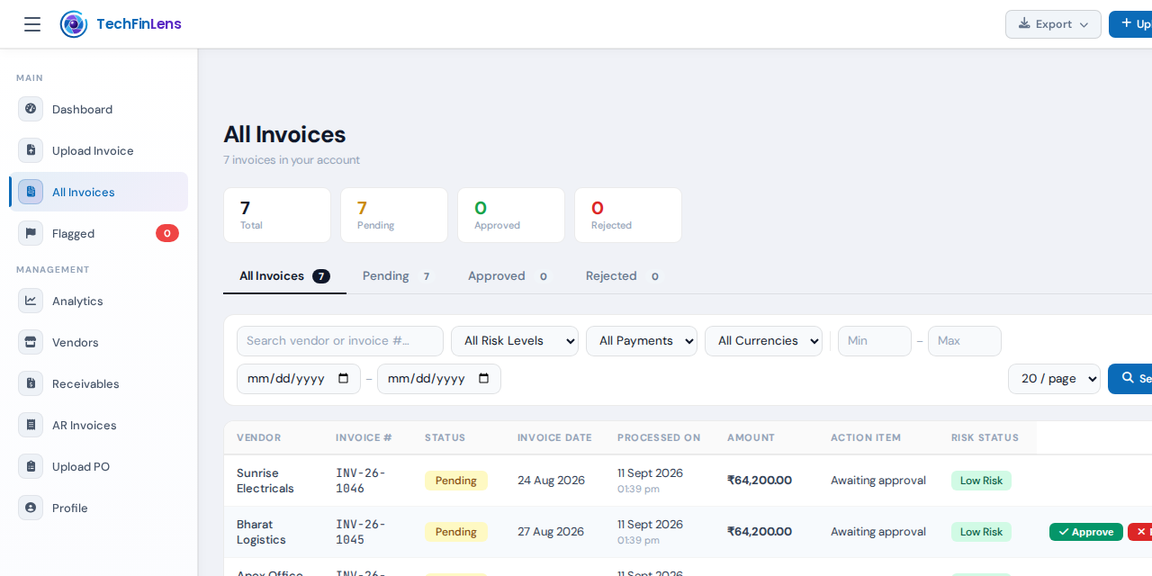
The invoice list in TechFinLens showing risk status per invoice
Every processed invoice with its risk status, filterable by risk level, payment status and date.
Review & approval

Only the risky ones reach a person

Every invoice lands in one of five risk tiers. Approvers are assigned by severity, so a low-risk invoice never sits behind someone waiting on a high-risk one.

Severity-based routingEach approver is assigned the severities they handle. Invoices go straight to the right person.
Reasons attachedEvery flag shows what triggered it, so a reviewer can decide without reopening the PDF.
Edit before savingExtracted fields and line items can be corrected in a preview step before anything is stored.
NotificationsApprovers are alerted by email, with WhatsApp alerts available.
Verification reportA PDF report of the checks and their results, for your audit trail.
Five risk tiers
Critical
Hold the payment. Multiple serious flags.
High
Needs a senior approver before release.
Medium
Review the flagged detail and confirm.
Low
Minor note. Usually cleared quickly.
Passed
No anomalies found. Nothing to review.
Also included

Built for real AP teams

Purchase orders

Upload POs as PDF, image or template. Invoices are matched against them, and duplicate POs are detected.

Vendor records

A supplier list built from your invoices, with history that powers the outlier and bank-change checks.

Analytics

Totals, flag distribution and risk breakdown over any period, exportable to CSV.